
Common PC Mistakes That Let Hackers Steal Your Accounts
Stop hackers from stealing your accounts! Discover 5 common PC mistakes (password reuse, public Wi-Fi, phishing) and how to fix them in 30 seconds.
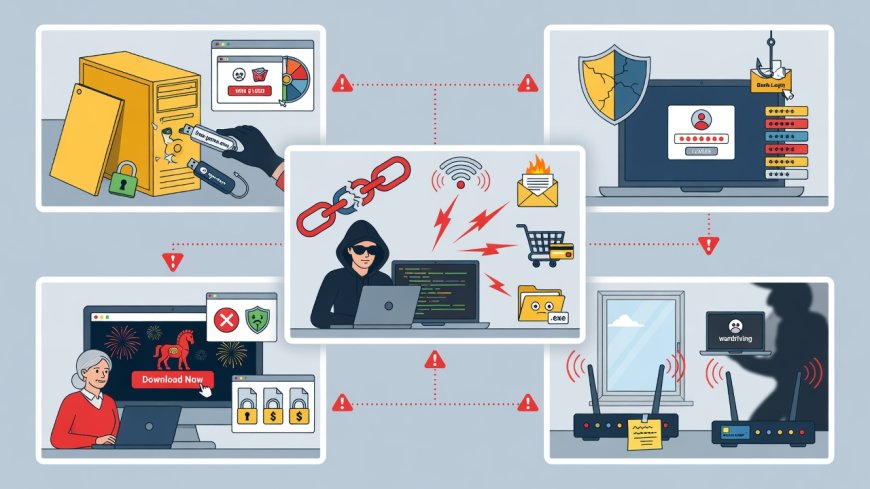
Introduction: Your Password Isn’t the Only Weak Link
Hackers don’t need complex tools to break into your accounts—they just need you to make one simple mistake. According to the FBI, 80% of data breaches involve compromised credentials, and most stem from basic user errors. If you’ve ever used the same password for email and banking, clicked a "free antivirus" link, or skipped software updates, you’re already at risk. Let’s fix these mistakes today.
1. Using the Same Password Everywhere (The #1 Mistake)
Why it’s dangerous:
If one site (like a dating app or forum) gets hacked, all your accounts are exposed. Hackers buy breached data on the dark web and test it across banking, email, and health portals.
Real-world impact:
In 2023, a health app breach leaked 1.2 million passwords. Hackers used these to access users’ Medicare accounts—stealing medical records and billing data.
How to fix it:
- Use a password manager (Bitwarden is free).
- Never reuse passwords—even for "low-risk" sites.
- Enable 2FA (Two-Factor Authentication) everywhere (use authenticator apps, not SMS).
Pro tip: If you can’t remember passwords, you’re doing it wrong. A password manager is safer than "password123" for your bank.
2. Ignoring Software Updates (The "I’ll Do It Later" Trap)
Why it’s dangerous:
Updates patch critical security flaws. A 2023 Microsoft report found 75% of exploited systems had unpatched vulnerabilities.
Real-world impact:
A hospital’s patient records were stolen via a single unpatched Windows flaw—costing $1.4 million in fines and reputational damage.
How to fix it:
- Enable automatic updates for Windows, macOS, and apps (like Chrome).
- Check for updates weekly (Settings > Update & Security).
- Never disable Windows Defender—it blocks 99% of known malware.
Pro tip: Updates are free security insurance. Skipping them is like leaving your house unlocked.
3. Clicking "Free Software" Links in Emails (Phishing 101)
Why it’s dangerous:
Hackers mimic legitimate brands (e.g., "Your Amazon Order" or "Bank Security Alert"). 36% of breaches start with phishing.
Real-world impact:
A finance employee clicked a "tax refund" email—giving hackers access to 500 client accounts and $200,000 in fraudulent transfers.
How to fix it:
- Never click links in unsolicited emails—type the URL manually.
- Check sender addresses (e.g., @amaz0n-support.com is fake).
- Hover over links to see the real URL before clicking.
Pro tip: If it says "Urgent!" or "Account Suspended," it’s 99% a scam. Legitimate companies don’t demand action via email.
4. Using Public Wi-Fi for Banking or Health Apps (The Coffee Shop Risk)
Why it’s dangerous:
Public networks let hackers intercept your data. A 2022 study found 68% of users access sensitive accounts on public Wi-Fi.
Real-world impact:
A user logged into their health portal (with sensitive diabetes data) on a café’s Wi-Fi—data was stolen and sold on dark web marketplaces.
How to fix it:
- Use a mobile hotspot (your phone) for banking/health apps.
- Enable HTTPS (look for the padlock icon) on all sites.
- Avoid public Wi-Fi for anything beyond checking email.
Pro tip: Your coffee shop’s Wi-Fi is like shouting your password in a crowded room. Don’t do it.
5. Leaving "Remember Me" On for Sensitive Accounts (The Convenience Trap)
Why it’s dangerous:
If your PC is lost or stolen, anyone can access your email, bank, or health portal. 40% of device thefts lead to account takeovers.
Real-world impact:
A doctor’s laptop was stolen from a clinic. "Remember Me" was enabled on her patient portal—hacker accessed 3,000 medical records.
How to fix it:
- Disable "Remember Me" for email, banking, and health apps.
- Set a short screen timeout (1-2 minutes) in Settings > Power.
- Use biometric login (fingerprint/face ID) instead of passwords.
Pro tip: Convenience is never worth your health records or bank balance.
The Bottom Line: Security Is a Habit, Not a One-Time Fix
| Mistake | Risk | 30-Second Fix |
|---|---|---|
| Password reuse | All accounts hacked in one breach | Install Bitwarden + enable 2FA |
| Skipping updates | Exploited by known flaws | Enable auto-updates |
| Clicking phishing links | Financial/data theft | Type URLs manually |
| Public Wi-Fi for banking | Real-time data interception | Use mobile hotspot |
| "Remember Me" on sensitive apps | Device theft = full account access | Disable "Remember Me" |
Your Action Plan (Do This Now):
- Run a password audit (use Bitwarden’s "Password Health" tool).
- Enable 2FA on all accounts (email, bank, health portal).
- Set auto-updates for Windows/macOS today.
- Delete "Remember Me" for anything involving money or health data.
Don’t wait. Hackers are actively scanning for these exact mistakes right now.
What's Your Reaction?
 Like
0
Like
0
 Dislike
0
Dislike
0
 Love
0
Love
0
 Funny
0
Funny
0
 Wow
0
Wow
0
 Sad
0
Sad
0
 Angry
0
Angry
0

I am an Application Security Certifier at Amazon. I train AI models for different companies and know where it is going. Follow me to read the news on Cybersecurity and AI development.






Comments (0)